
Parent Resources
The things parents and guardians need most often, in one place: the parent portal, reporting an
absence, the forms you must complete each year, the handbook, and how to raise a concern.
Genesis Parent Portal
Genesis is Franklin Township School District’s student information system. Through the
Genesis Parent Portal you can:
- complete or acknowledge beginning-of-year forms and agreements
- view your child’s class schedule and teachers
- view graded assignments and report cards
- report your child absent and view attendance records
Marking period grades are assigned four times a year; kindergarten grades three times a year.
If you cannot access the portal, contact the main office secretary.
Sign in to the Genesis Parent Portal (external)
Reporting an Absence
Report your child absent before the start of the school day, in any of these three ways:
- through the Genesis Parent Portal — see the steps below
- by email to ftsnurse@ftschool.org and
secretary@ftschool.org - by phone to the school office on (908) 735-7929, option 2
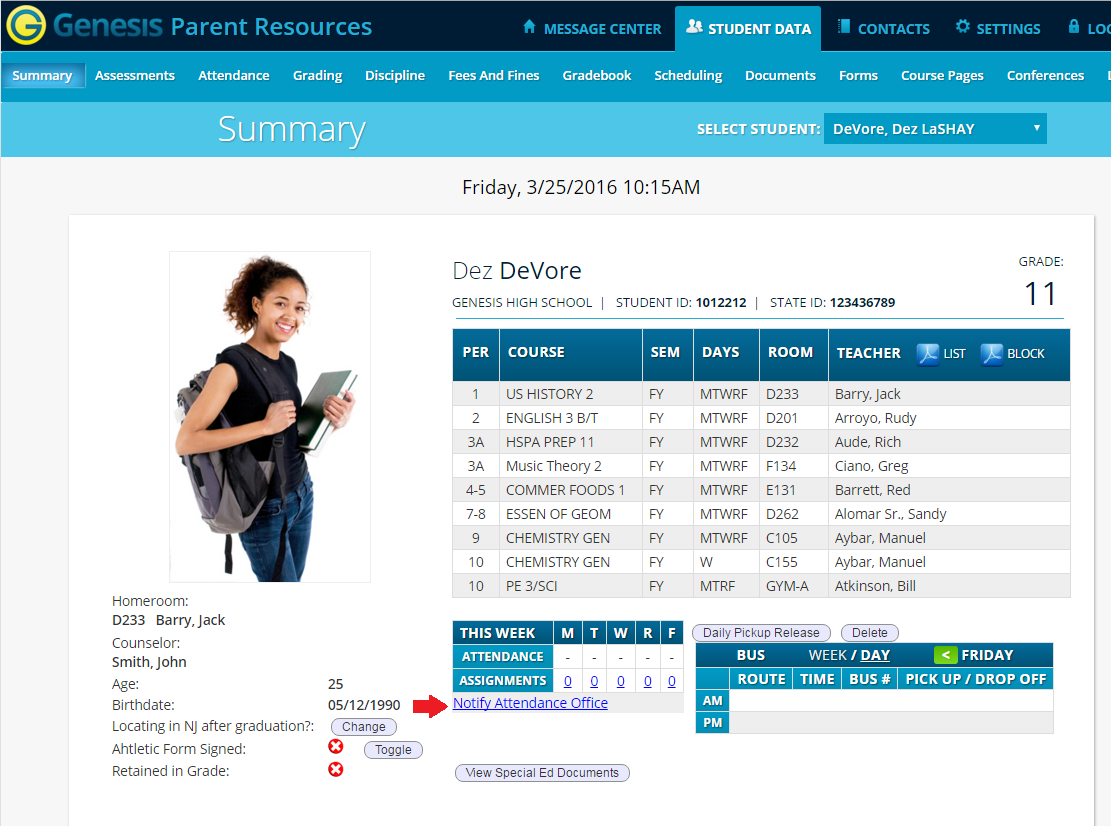
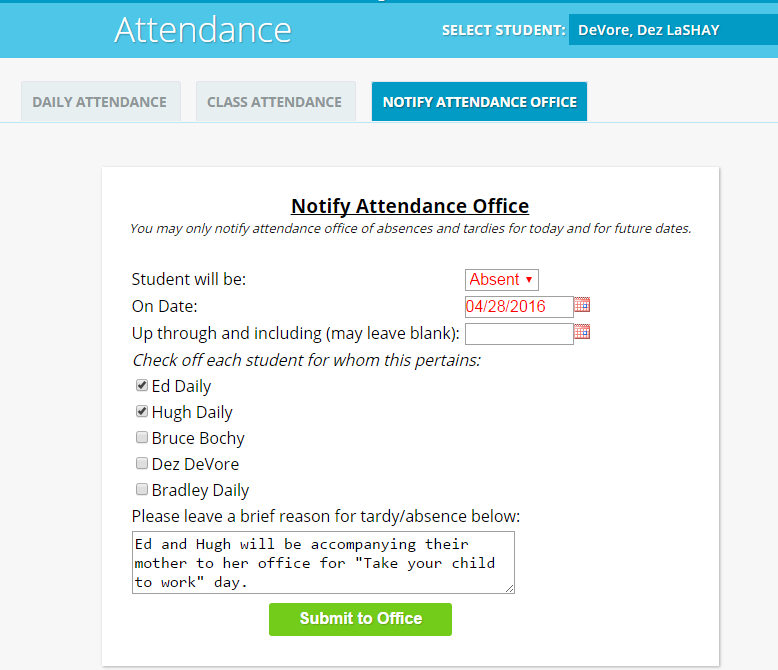
Reporting an Absence in Genesis
- Sign in to the Genesis Parent Portal (external).
- On the Summary tab, under This Week, click Notify Attendance Office.
- Select Absent from the Student will be dropdown.
- Tick the checkbox next to each child you are reporting absent.
- Type a brief reason for the absence.
- Click Submit to Office.
Forms Required Each School Year
The following forms are completed through the Genesis Parent Portal. Guardians must acknowledge
each one at the start of the school year — until they are done, you cannot see your child’s
gradebook or schedule.
- Annual Student Health Information
- Authorization for Over-the-Counter Medications
- Code of Conduct acknowledgement
- Emergency form
- Notice of Social/Sexual Health Instruction opt-out letter — grades 2, 5, 7 and 8 only
- Parent-Student Handbook acknowledgement
- Photo consent
- Technology agreement
Other forms — sports health forms, student health forms, new student registration, records
requests and the Chromebook loan agreement — are on the Forms page.
Parent-Student Handbook
The handbook is the single reference for school rules, routines and expectations. You acknowledge
it through Genesis at the start of each year, but it is worth reading in full.
FTS Parent-Student Handbook (PDF)
Before and After Care
Before and after school child care at Franklin Township School is run by the YMCA of River
Crossing, not by the school. Registration, fees and scheduling are handled directly by the YMCA.
YMCA River Crossing — Franklin Township before and after school care (external)
Reporting a Concern
During the school year you may have a concern, complaint, suggestion or request about a school
decision or policy. Most questions are answered quickly by speaking to the person responsible for the
class, activity or program. Start at the level where the original decision was made, and move up
only if the matter is not resolved.
Academic Concerns
- Teacher
- Counselor
- Principal
- Chief School Administrator
Behavior, Attendance and Discipline Concerns
- Teacher
- Principal
- Chief School Administrator
Concerns about harassment, intimidation or bullying follow a separate statutory process — see
Harassment, Intimidation & Bullying Information.
Draft note for the Steward — delete before publishing: Layout changes from your draft, all of them reversible: bold pseudo-headings are now real H2/H3 (Standard 4.1); the horizontal rule is gone, since the headings now do that work; “GENESIS PARENT PORTAL” in caps is now sentence case (Standard 3.4); external links are labeled (Standard 2.7); the two screenshots have real alt text; and the pointer to a separate Genesis page is replaced by the content itself, since that page does not exist in the new structure. Two sections added from the restructure plan: forms and before/after care. Your draft listed “Superintendent” as the final escalation step — the title used everywhere else on the site is Chief School Administrator, so I have used that. Revert if the handbook says otherwise.